Built by traders, for traders

Never miss a candle close again.

You focus on reading the chart. Kandl watches the clock and tells you right before the candle closes, on any market and timeframe, even with your phone locked.

Get it on Google Play iOS · Coming soon See how it works

Free · No sign-up · Android

M15--:--
M30--:--
H1--:--
H4--:--

↑ This is live: time left until these candles close, right now.

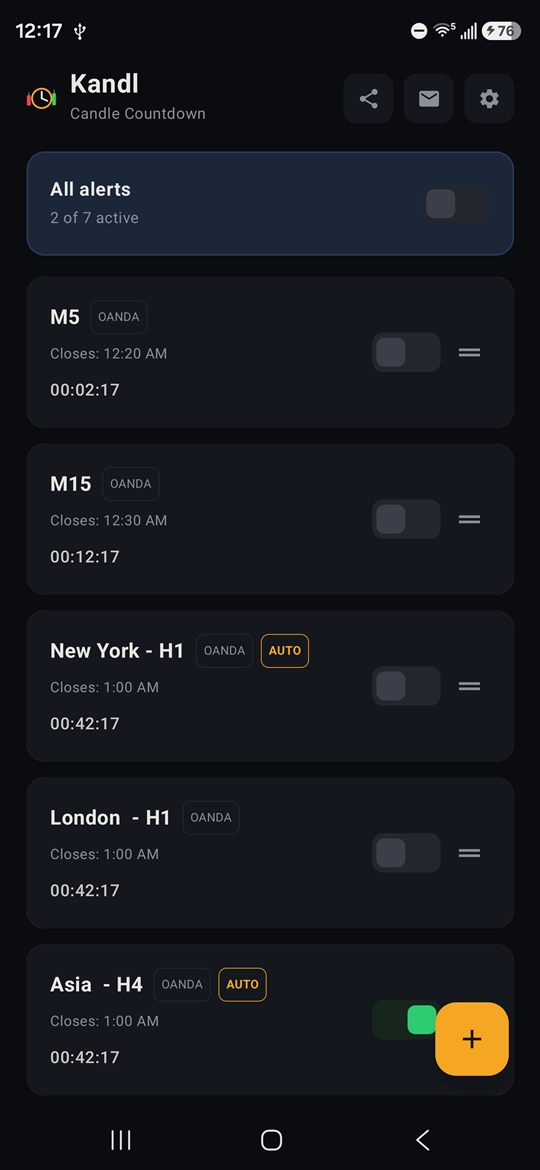
Home: your alerts with a live countdown

Why I built Kandl

I'm a trader. I trade on H1 and M15, and my rule is simple: I only act when the candle closes.

The problem was that the chart would swallow me. Drawing levels, checking the higher timeframe, waiting for confirmation… and when I looked up, the H1 candle had closed five minutes earlier. The entry was gone and I was chasing price. It happened more times than I'd like to admit.

Phone alarms didn't fix it: I forgot to reset them, and they never matched my broker's candle times. So I built the tool I needed. You analyze in peace; Kandl watches the clock.

— Gustavo, trader and creator of Kandl

Without Kandl
14:38
Marking levels on the H4 chart
14:50
Checking the daily trend
14:58
Waiting for H1 to confirm
15:00
H1 closed. I didn't notice in time.
15:04
Chasing the move…
With Kandl
14:38
Marking levels on the H4 chart
14:50
Checking the daily trend🔔 Kandl: “H1 closes in 10 min”
14:58
Waiting for H1 to confirm🔔 Kandl: “H1 closes in 2 min”
15:00
H1 closed🔔 Kandl: “H1 just closed”
15:01
Executed on time ✓
Everything you need to be on time for the close

Made for traders who can't stare at the chart all day.

⏱️

M1 to D1

M1, M5, M10, M15, M30, H1, H4 and D1. Create an alert for every timeframe you trade.

🔔

Reminders your way

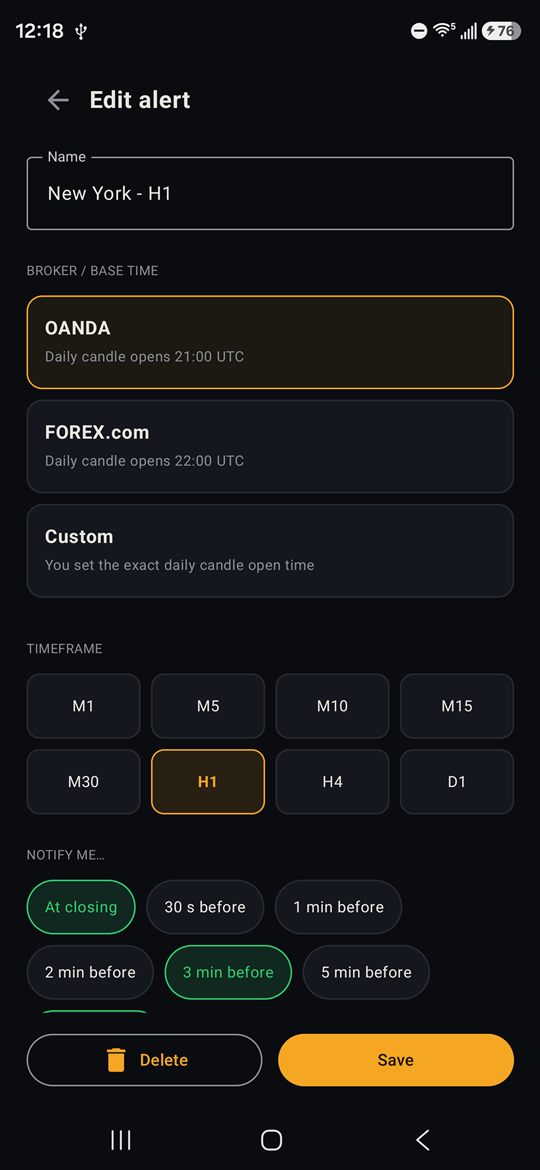
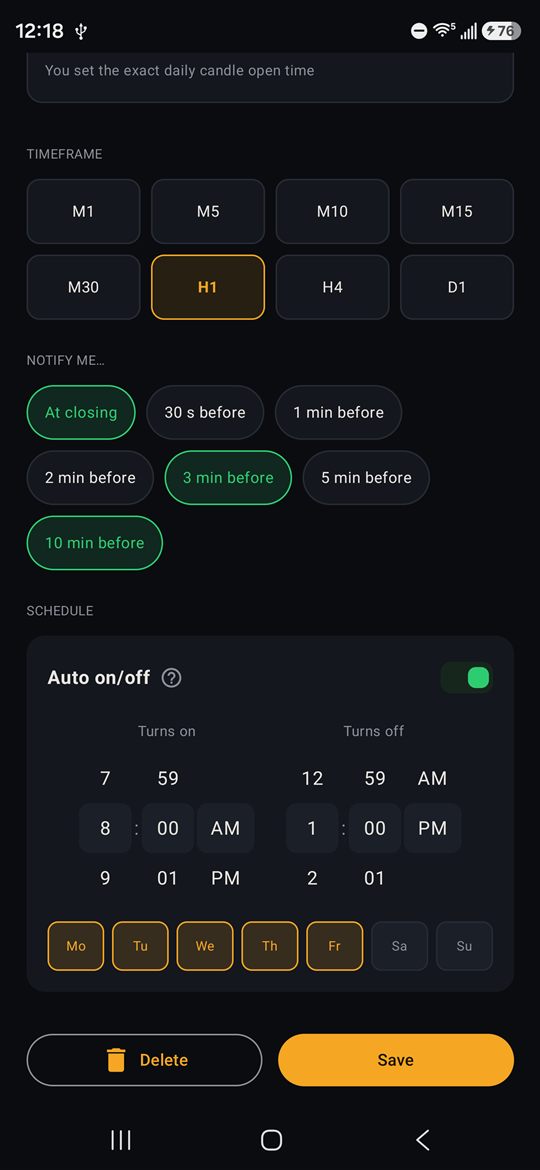
At the close, or 30 s, 1, 2, 3, 5 or 10 minutes before. With Kandl's own soft, short tones, or silent.

🔒

Rings even when locked

Exact system alarms: they work with the screen off and the app closed.

🗓️

Auto on/off

Set your trading hours once and Kandl turns your alerts on and off by itself, or only turns them off when your session ends. Set it and forget it.

🏦

Your broker's schedule

OANDA, FOREX.com, or the daily open time of any other broker, exchange or prop firm. Save your own broker profiles with a name.

⌚

On your wrist

See your alerts and switch them on or off from your Wear OS watch, with your next alarm and its countdown on the watch face.

🧩

Home-screen widgets

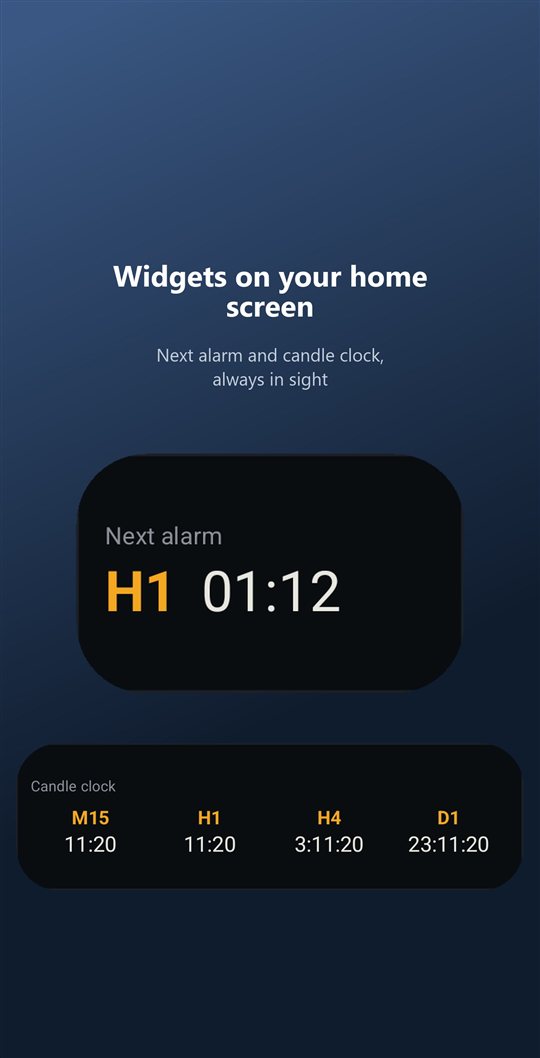
Next-alarm countdown, a candle clock for your timeframes and a one-tap switch for all your alerts.

🚀

Ready in 4 steps

Your first alert is guided: timeframe, broker schedule, how early to be notified and Auto on/off.

🌍

15 languages

English · Español · Português · Français · Deutsch · Italiano · Русский · Türkçe · العربية · हिन्दी · Bahasa Indonesia · Tiếng Việt · 日本語 · 한국어 · 中文

IndicesStocksCryptoForexFuturesGold & commodities
Home: your alerts with a live countdown Create an alert: broker and timeframe Reminders and Auto on/off Widgets: next alarm and candle clock

Start free. Go Pro whenever you want.

Google Play shows prices in your local currency.

Free

Try every basic feature
$0
forever
  • Up to 3 alerts
  • Reminders at the close and 1, 5 and 10 min before
  • Live countdown
  • Kandl tones or silent mode
  • Home-screen widgets
Start free
Most popular

Kandl Pro

US$1.25/month
Billed US$14.99 once a year
  • Unlimited alerts
  • Every reminder option
  • Auto on/off on your schedule
  • Wear OS app and watch complication
  • Custom sound
  • No ads
Go Pro

Lifetime access

★ Best long-term value · pays for itself in ~2 years vs monthly
US$49.99 once
one payment · no renewals
  • Pay once, yours forever
  • All future Pro features included
  • Unlimited alerts
  • Every reminder option
  • Auto on/off on your schedule
  • Wear OS app and watch complication
  • Custom sound
  • No ads
Get lifetime access
🔒

Your alerts never leave your phone

Kandl has no accounts and no servers: everything is calculated on your own phone, in your local time. The free version shows Google ads; Kandl Pro has no ads. Privacy policy

FAQ

Does it work with my broker?

Yes. It comes with OANDA and FOREX.com timing, and for any other broker, exchange or prop firm you can set the daily open time your platform uses.

Does it work if I close the app?

Yes. Kandl uses exact system alarms, so it rings with the screen locked and the app closed.

Do I need an account?

No. There's no sign-up: open the app and create your first alert.

Is there an iPhone version?

Kandl is Android-only for now. Write to us if you'd like an iPhone version.

Does it handle daylight saving time?

Yes, broker schedules adjust automatically when daylight saving time changes.

What is a candle close alert?

A candle close alert tells you shortly before a chart candle finishes, for example 5 minutes before the H1 candle closes. Many traders only act on a closed candle, so Kandl keeps the clock for you while you analyze.

Does Kandl give trading signals?

No. Kandl is a timing and reminder tool. It doesn't give signals, analysis or financial advice, it doesn't connect to any broker and it doesn't place trades.

Which markets and timeframes does it support?

Any market that has candles: forex, crypto, stocks, indices, futures, gold and commodities. Timeframes go from M1 to D1 (M1, M5, M10, M15, M30, H1, H4 and D1).

How much does Kandl cost?

Kandl is free with up to 3 alerts. Kandl Pro adds unlimited alerts, every reminder option and Auto on/off: US

Does it handle daylight saving time?

Yes, broker schedules adjust automatically when daylight saving time changes.

.99 a month, US
Does it handle daylight saving time?

Yes, broker schedules adjust automatically when daylight saving time changes.

4.99 a year or US$49.99 once. Google Play shows the price in your local currency.

Your next candle closes soon.

Download Kandl and create your first alert in under a minute.

Get it on Google Play iOS · Coming soon